Software for live hardware

From live signals to real control.

Acquire telemetry, command hardware, and automate test sequences in one connected workspace.

Start your first session
Explore the interfaceSee your system. Control the next step.

Connect. Operate. Understand.

01 / Channel Searcher

Find the signal. See its state.

Search live channels and inspect values, units, freshness, and command authority in one place. Follow a signal into its task, recorded data, or exporter when you need more context.

Explore Channel Search
DARTWIC channel searcher with live values, sparklines, provenance, recording, and command-authority fields
02 / Operate

Put live hardware in view.

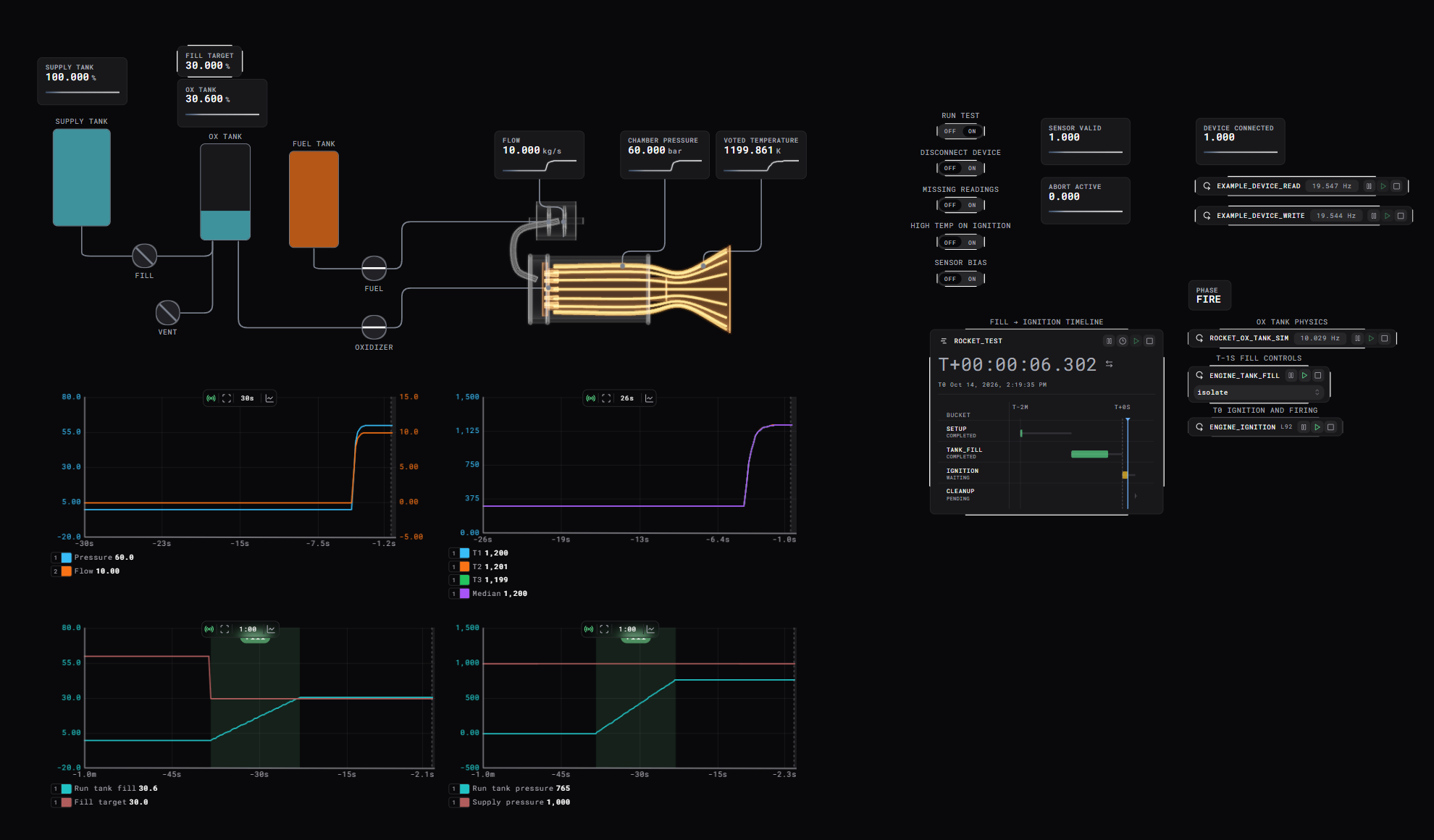
Bring channels, plots, and interactive schematics together. Inspect live values and issue commands with the system in context.

Explore schematics
DARTWIC operator schematic for an automated supply-tank and run-tank fill sequence
03 / Automate

Put your logic to work.

Sequences, sensor calculations, events, and reusable controls—written in DCode.

Explore DCode

Sequence hardware with explicit ownership. command claims automatic authority and writes; set publishes observe-only state; free releases ownership for the operator handoff.

  • Automatic authority
  • Observe-only state
  • Explicit release
auto_fill.dcode DCode73 lines
task_state_machine tasks_autofill:
    states:
        isolate
        fill
        manual

    state isolate:
        set |autofill_active| = 0
        command |tank_sim_supply_fill_valve| = 0
        command |tank_sim_run_tank_vent_valve| = 0

        if target_state == states.fill:
            transition fill

        if target_state == states.manual:
            transition manual

    state fill:
        once:
            set |autofill_active| = 1
            state.fill_phase = "vent"
            local fill_target = promptNumerical(
                "Run Tank Auto Fill Target",
                "Enter the target fill percentage for the run tank.",
                {"tank_sim_run_tank_fill_target"},
                "Enter target."
            )
            command |tank_sim_run_tank_fill_target| = fill_target

        if state.fill_phase == "vent":
            command |tank_sim_supply_fill_valve| = 0
            command |tank_sim_run_tank_vent_valve| = 1

            if |tank_sim_run_tank_pressure| <= 500:
                state.fill_phase = "fill"
        else:
            command |tank_sim_supply_fill_valve| = 1
            command |tank_sim_run_tank_vent_valve| = 0

            if |tank_sim_run_tank_pressure| >= (|tank_sim_supply_tank_pressure| * 0.9):
                state.fill_phase = "vent"

        if |tank_sim_run_tank_fill| >= |tank_sim_run_tank_fill_target|:
            message(
                "Run Tank Auto Fill Complete",
                "The run tank reached its requested fill level and is being isolated.",
                {"tank_sim_run_tank_fill", "tank_sim_run_tank_fill_target"},
                "-"
            )
            transition isolate

        if target_state == states.isolate:
            transition isolate

        if target_state == states.manual:
            transition manual

    state manual:
        once:
            set |autofill_active| = 0
            free |tank_sim_supply_fill_valve|
            free |tank_sim_run_tank_vent_valve|

        if target_state == states.isolate:
            transition isolate

        if target_state == states.fill:
            transition fill

    end:
        set |autofill_active| = 0
        command |tank_sim_supply_fill_valve| = 0
        command |tank_sim_run_tank_vent_valve| = 0
04 / Events

See what needs your attention.

Review warnings, errors, and operator prompts in the ARGUS events board. Open an event to understand its source, related channels, and available actions before responding.

Explore ARGUS Events
DARTWIC ARGUS event board with warnings, errors, prompts, and linked channel history
05 / Review

Know what happened after the run.

Plot recorded telemetry, inspect events, and export data for analysis. Follow an unexpected result back to its signals.

Review and export data
DARTWIC telemetry workspace with several live and historical channel plots

Built to be extended

Your hardware. Your interface.

Write native device drivers in C++ or extend the interface with new tools. Plugins let you build into DARTWIC, from the engine backend to the operator's workspace.

Explore plugin development

C++ / Engine plugins

Native drivers. Inside the engine.

Your C++ plugin runs natively in the engine backend and talks directly to your device or its SDK. No separate client, network bridge, or extra network hop between your driver and the engine—just your device's own connection.

  • Direct device access
  • Native runtime logic
  • Channels, tasks & commands
Build an engine plugin

React / Interface plugins

Make the interface your own.

Add new functionality directly to the DARTWIC interface: custom resource pages, task editors, settings panels, and schematic nodes. Build the tools your operators need into their existing workspace.

  • Custom views & controls
  • Task & module editors
  • Schematic nodes
Build an interface plugin

Names and marks identify the respective technologies; no endorsement is implied.

In use

From hardware to operator control.

Discover devices, configure channels and tasks, use channels directly in DCode, and build an operator interface around them.

01 / Device discovery
DARTWIC discovery dialog showing a detected Modbus TCP module, its address, and 16 suggested channels
02 / Channel & task setup
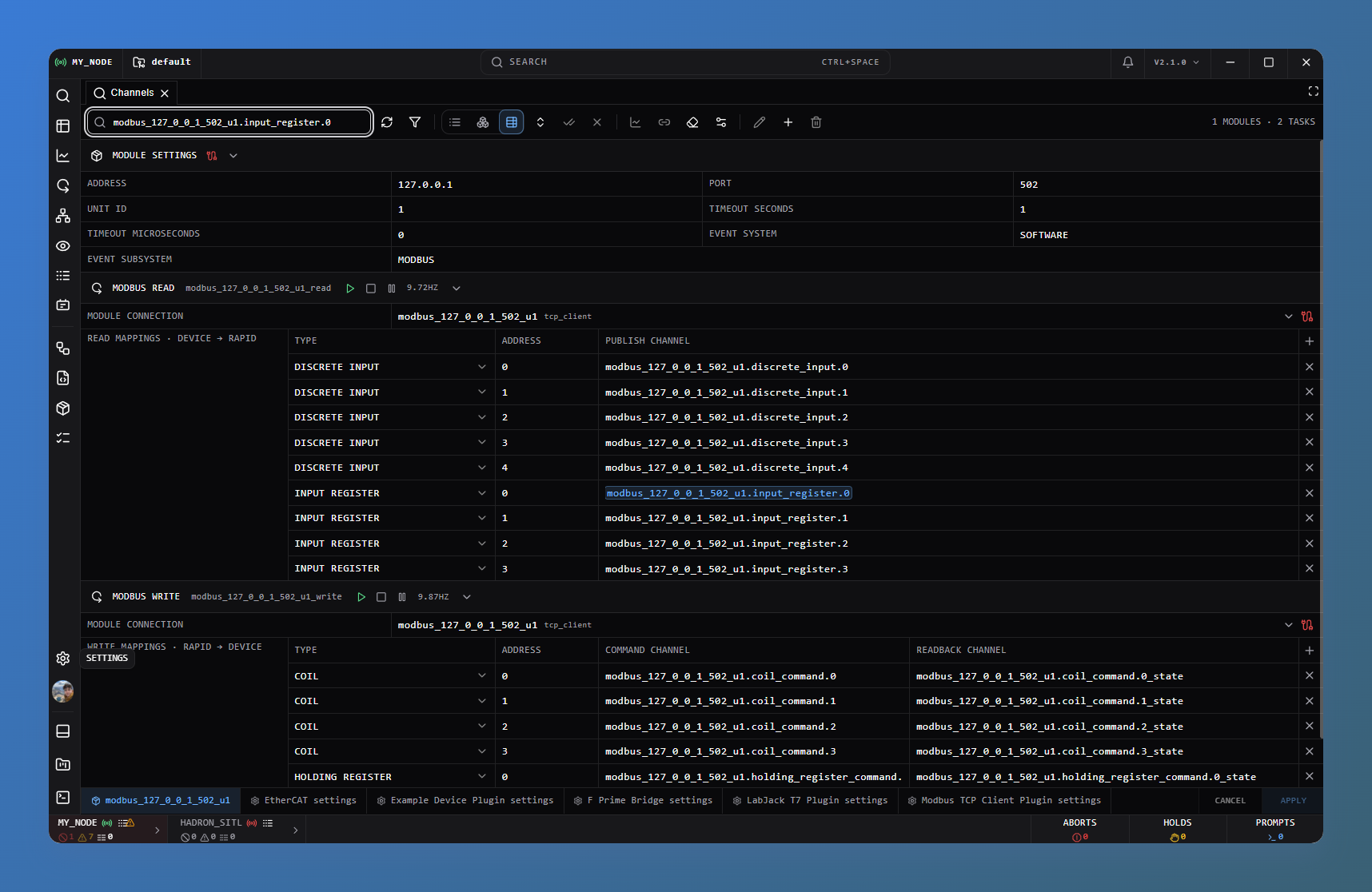
Connected Modbus TCP module with read and write task controls, running linked tasks, and live channel values and plots
03 / Use channels in automation
DCode tank-fill state machine reading pressure and fill channels and commanding supply and vent valves directly
04 / Build an operator interface
Channel-driven operator schematic showing supply and run tanks, valve controls, autofill state, and live fill history

Remote nodes

One system. Across nodes.

Connect DARTWIC nodes to share channels and events across your system. See how your interface, engine, and remote nodes connect in the Cluster Map.

Explore the Cluster Map
DARTWIC Cluster Map connecting a desktop interface to an engine and a remote node, with telemetry, uplink, and downlink activity

Node to node

Share channels. Share events.

Link DARTWIC engines and bring remote telemetry and ARGUS events into your operator workspace. Keep the originating node in context as you work across the system.

Connect remote nodes

Your system, connected

Bridge beyond DARTWIC.

Write a custom bridge to exchange channels and events with a separate system—like a flight computer. Map its protocol into DARTWIC and back, exposing the data and actions your integration supports.

Explore integration plugins

Beyond the interface

Your tools. Connected.

Plugins bring hardware into the engine. Clients bring the engine into your tools—whether that's a Python script for analysis or a React dashboard built for your team.

PythonScripts & analysis

Work with data your way.

Find channels, query recorded ranges, and call engine operations from your own scripts. Spend your time on the analysis, not rebuilding the connection.

  • Dataframe & channel search
  • Bounded history queries
  • Runtime compatibility checks
Connect and find channels
find_channels.py Python6 lines
from dartwic_client import DartwicClient

client = DartwicClient()
client.connect(ip="127.0.0.1", port=7000)
keys = client.get_channel_keys(query="rpm")
client.disconnect()
ReactDashboards & applications

Build your own view.

Bring live telemetry and engine operations into a custom React app. Use a provider and hooks to build the views and controls your workflow needs.

  • Live channel state
  • Stale-data awareness
  • Subscriptions restored on reconnect
Provider and hook · integration sketch
Dashboard.jsx JSX7 lines
// Wrap your app
<DartwicProvider>
  <YourDashboard />
</DartwicProvider>

// Inside YourDashboard
const { channels, connect } = useDartwic();

Start building

Your next step.

Try a first session, connect your own hardware, or build a custom integration.